
Antiqly for Chrome is a browser extension that identifies antiques, vintage items and collectibles from the photos you are already looking at online. Right-click a picture on eBay, Etsy, an auction catalogue, a dealer’s shop or any other page, choose Identify with Antiqly, and a side panel next to the page tells you what the item probably is, roughly when and where it was made, what any visible marks mean, an estimated secondhand value range and what to check before you buy or sell.
It is made by Obzena LLC, the same team behind this site and the Antiqly app for iPhone and Android. This page explains exactly how it works, what a result contains, what it costs, what data it sends and where its limits are, so you can decide whether it fits the way you shop.
What Antiqly for Chrome does
Most antique shopping now starts on a screen. Listings are written by sellers who often don’t know what they have (“old silver teapot, see photos”), or who know exactly what they want you to believe (“rare Meissen”). The extension gives you a second opinion on the photo itself, without leaving the listing, uploading files or switching to your phone.
- Works on the page you’re on. eBay, Etsy, Facebook Marketplace in the browser, online auction catalogues, estate-sale sites, dealer websites, museum collections and image search results all work the same way, because Antiqly reads the image you choose rather than a specific site’s layout.
- Three ways to start: right-click an image and choose Identify with Antiqly; press Alt+Shift+A (or right-click the page and choose Pick an image on this page to identify) and click any picture; or paste an image address into the side panel.
- Results in Chrome’s side panel, so the listing stays visible while you compare the seller’s description with the identification. A result usually takes 10 to 20 seconds.
How to install and use it, step by step
1. Add the extension
Open the Antiqly listing in the Chrome Web Store and click Add to Chrome. Pin the Antiqly icon from the puzzle-piece menu if you want one-click access to the side panel. There is no account to create; a random installation ID links your plan to that browser.
2. Choose a photo
Right-click the item photo and choose Identify with Antiqly. On sites where right-click is blocked or the photo sits behind a gallery overlay, press Alt+Shift+A: the page dims, images are highlighted as you hover, and you click the one you want (press Esc to cancel). Pick the clearest, largest view of the object. Very small images (under 80 pixels on the long side, such as icons and thumbnails) are refused.
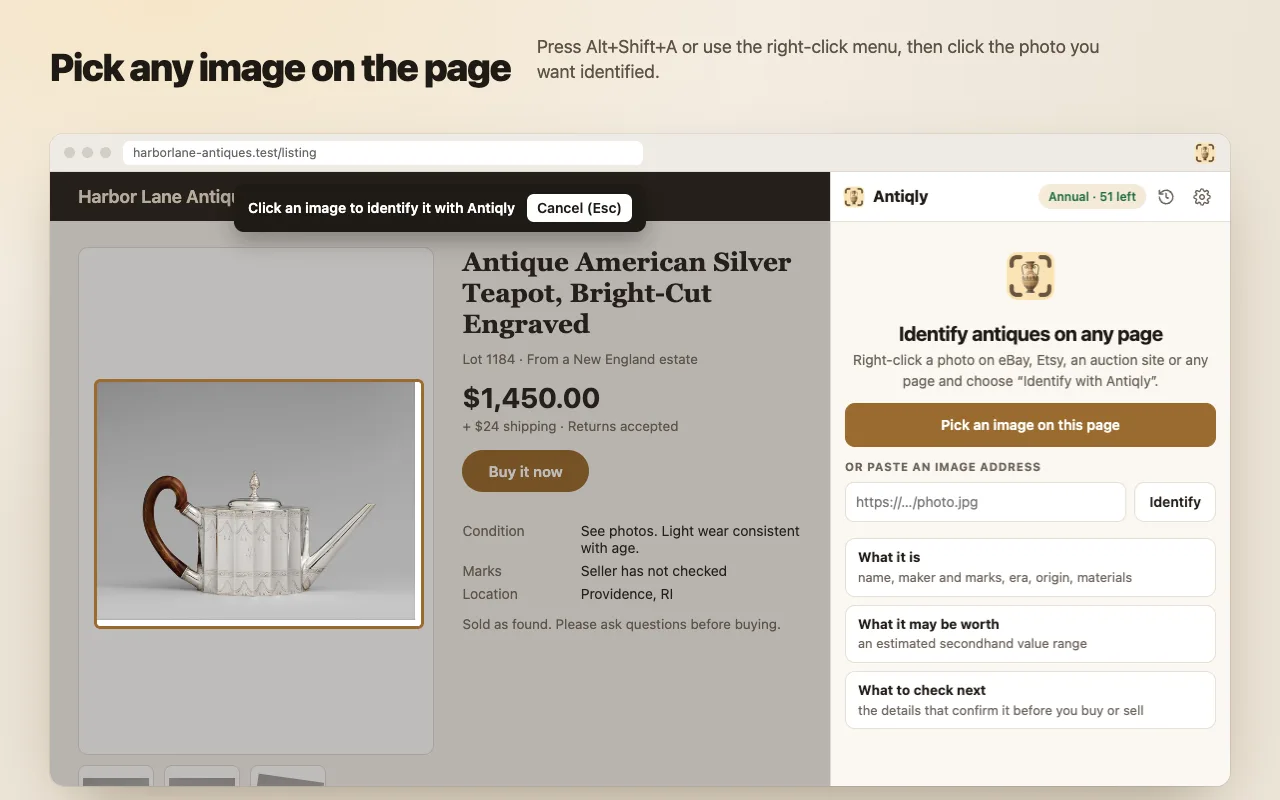
3. Read the result in the side panel
The side panel opens with the identification. From there you can run Search similar on eBay with a search phrase written for that item, copy the result as text for your notes or a message to the seller, or identify another image.
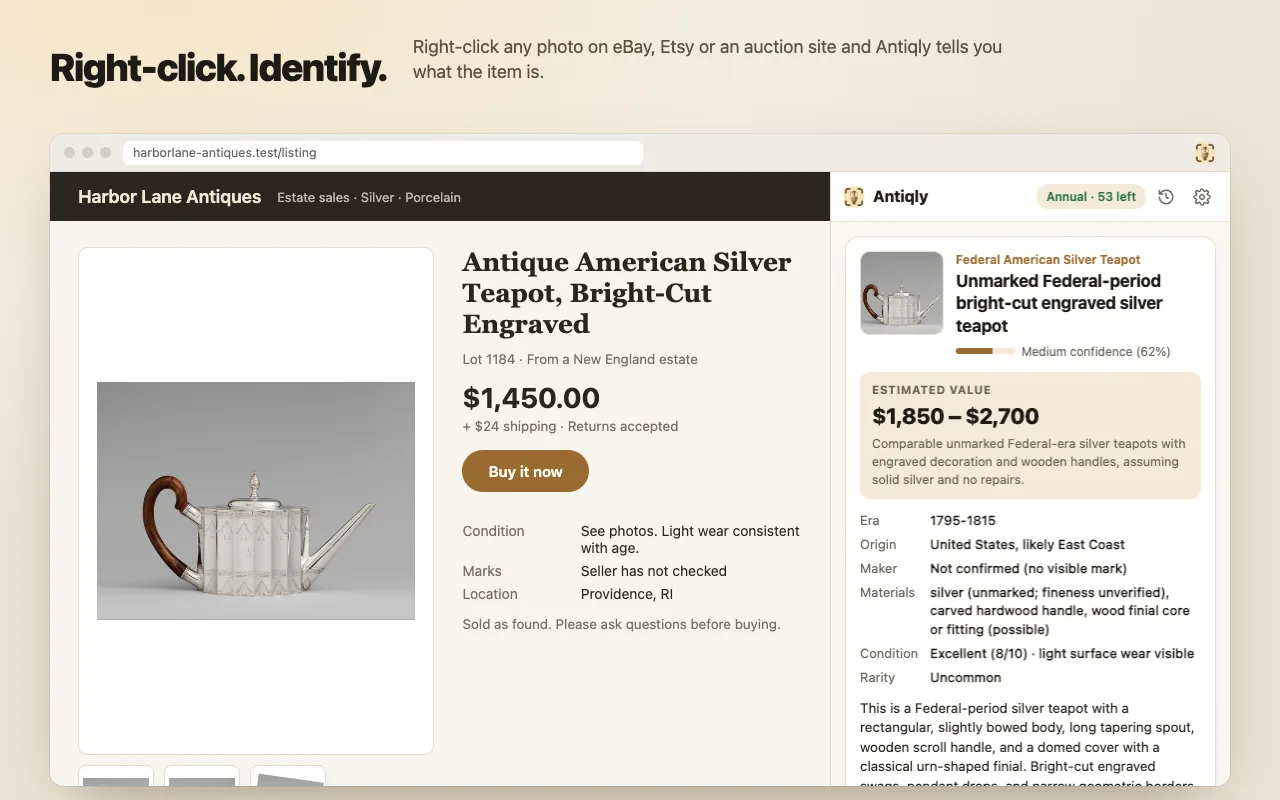
What you get in a result
Every identification returns the same structured set of fields, so results are easy to compare between listings:
| Field | What it tells you |
|---|---|
| Name and category | A specific description (for example “Unmarked Federal-period bright-cut engraved silver teapot”) and the category it belongs to. |
| Confidence | How sure the identification is overall, shown as low, medium or high with a percentage. An unconfirmed maker lowers it. |
| Era and origin | The likely date range and place of manufacture. |
| Maker | The maker when a mark or a distinctive design supports it; otherwise it says the maker is not confirmed and uses “in the style of” or “consistent with”. |
| Maker’s mark | When a hallmark, backstamp, signature or label is visible: what it looks like and what it means, with its own confidence level. |
| Materials | For example sterling silver (925), silver plate, hard-paste porcelain, walnut veneer, with caveats such as “fineness unverified”. |
| Condition and rarity | A 1-10 condition reading of what the photo shows, with a short note, and a rarity level from common to extremely rare. |
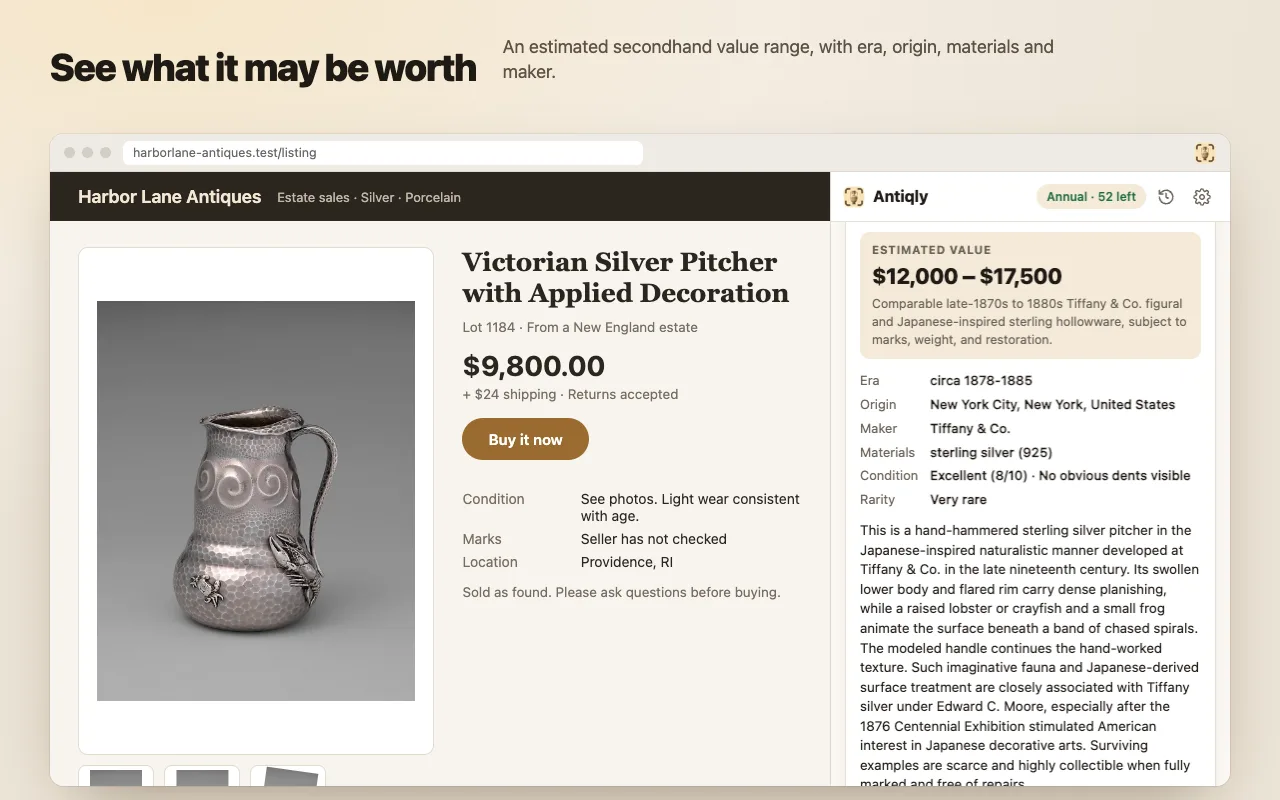
| Estimated value | A secondhand market range in USD, EUR, GBP, CAD or AUD (you choose in settings), with one sentence on what the estimate is based on. The top of the range is never more than 1.5 times the bottom. |
| Description | A short paragraph on style, construction and history. |
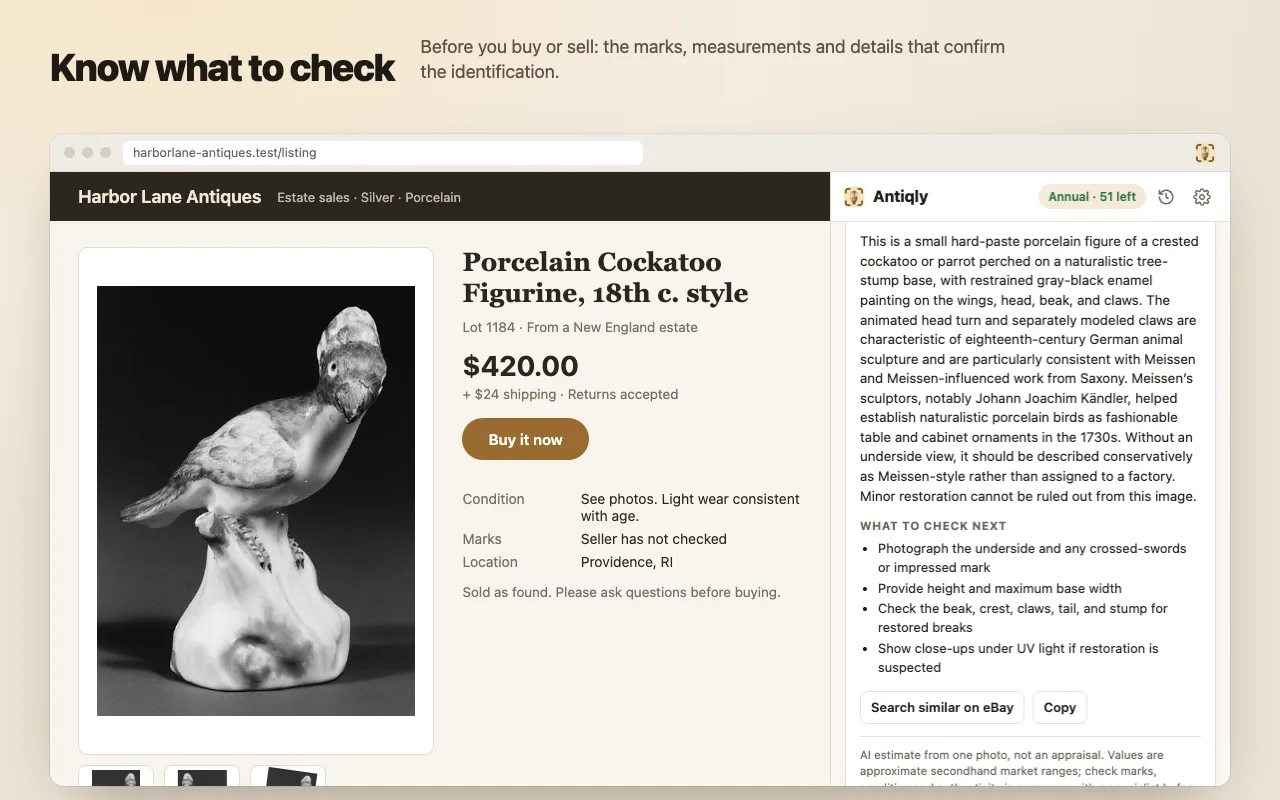
| What to check next | The concrete things that would confirm or change the identification: the base, the weight, a measurement, signs of repair. |
The value is what comparable items typically sell for secondhand today (eBay, regional auctions, dealers), not insurance or replacement value, and it ignores the asking price written on the page. If an item can’t be priced from a photo at all, for example a painting whose attribution matters or a loose gemstone, Antiqly leaves the range empty and says why instead of inventing a number.
When it is useful
Checking a listing’s claims before you bid
A seller writes “Meissen” or “sterling”. Antiqly describes what the photo actually supports. In the porcelain figure below, it calls the bird “Meissen-style” and explains that without an underside view it should not be assigned to a factory, then lists what to ask the seller for: a photo of the base and any crossed-swords mark, the height, and close-ups of the beak and claws where restorations hide.
Browsing online estate sales and thrift listings
Estate-sale and auction catalogues often run to hundreds of lots described in a few words. Identifying the handful of pieces that catch your eye tells you which ones deserve a closer look, a question to the auction house or a trip to the preview day.
Researching marks and makers
When a listing includes a close-up of a hallmark or backstamp, identify that photo on its own: Antiqly describes the mark and decodes it when it recognises the system. Pair it with our guides to where to find hallmarks and maker’s marks and pottery and porcelain marks to confirm what you see.
Pricing something you plan to sell
Before you list a piece, identify comparable listings and your own photos, then use Search similar on eBay to see what close matches actually look like. Your last 20 identifications stay in the History panel so you can come back to them.
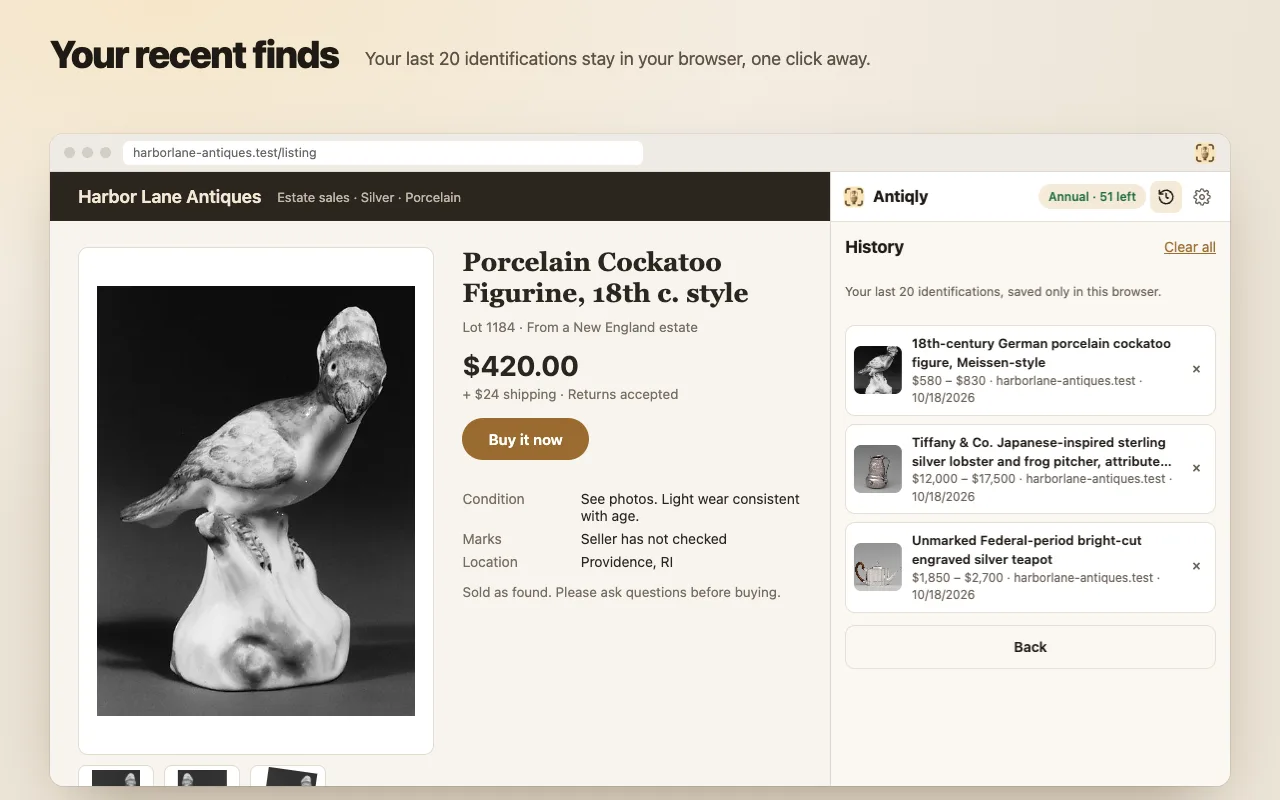
Limits: what it can’t tell you
Antiqly for Chrome gives an AI-assisted estimate from a single photo. It is useful for orientation and for asking better questions, but it has real limits:
- It only sees the photo. It can’t weigh silver, feel a glaze, test a metal, see the back that wasn’t photographed or detect a skilled restoration. If the mark isn’t in the picture, it can’t read it.
- It is not an appraisal and it does not authenticate. Values are approximate secondhand ranges, not a price guarantee and not suitable for insurance, estate, tax or legal purposes.
- Seller photos can mislead. Heavy editing, stock images or a photo of a different item will produce an identification of what is shown, not of what will arrive.
- Some things can’t be priced from a picture, such as fine art attribution, gemstones and unknown materials. In those cases the value is left empty.
Get a qualified appraiser or specialist involved when the decision is expensive or formal: a purchase you couldn’t afford to get wrong, an item you suspect is valuable, insurance cover, an estate division or a donation. Our comparison of online antique appraisal services explains the options.
Pricing
Installing the extension doesn’t cost anything, but identifying requires a plan. There is no trial and no no-cost tier.
| Plan | Price | Identifications |
|---|---|---|
| Weekly | $7.99 per week | 50 per week |
| Annual | $39.99 per year (about $0.77 a week) | 60 per month |
- Prices are in US dollars; taxes may apply. Payment happens on Stripe’s secure checkout page, and the extension never sees your card number.
- Plans renew automatically until you cancel. Cancel any time from Manage subscription in the extension’s settings; access continues until the end of the period you paid for. Removing the extension does not cancel the subscription.
- Images that turn out not to show an item (a logo, a banner, a screenshot of text) are not counted, up to 10 per period. Unused identifications don’t carry over.
- Changed computers or reinstalled? Restore purchase moves your plan to the new installation with a 6-digit code sent to your checkout email.
Privacy: what is sent and where
- Antiqly reads a page only when you ask it to (the right-click menu, the shortcut or the pick button). It has no access to your other tabs and does not collect browsing history.
- For each identification it sends the image you chose (resized to at most 1024 pixels, or its web address if the browser can’t read it), that image’s alt text, the page title and the site’s domain to Obzena’s server and to OpenAI’s API, which produces the identification.
- Images are not stored on our server, and OpenAI does not use API data to train its models. The result is kept on the server for 24 hours so a retried request isn’t counted twice.
- Your history and settings live in your browser. No ads, no data sales.
The full details are in the Antiqly for Chrome privacy policy and terms of use.
Browser compatibility
Antiqly for Chrome needs desktop Google Chrome version 116 or later on Windows, macOS, Linux or ChromeOS, because it uses Chrome’s side panel. Chrome on iPhone, iPad and Android phones does not run extensions; on a phone, use the Antiqly app instead. Other Chromium-based browsers that install from the Chrome Web Store may work, but Google Chrome is the browser we test and support.
Chrome extension or the Antiqly app?
They solve the same problem in two places. The extension is for photos on a screen: listings, catalogues and auction pages you browse on a computer. The Antiqly app for iPhone and Android is for objects in your hands: you photograph the piece itself, its base and its marks with your phone’s camera, which usually gives a better identification than a seller’s photo. The extension and the app are sold separately; a plan for one does not unlock the other.
Frequently asked questions
Which websites does it work on?
Any page that shows the image in the browser, including eBay, Etsy, Facebook Marketplace on the web, auction and estate-sale sites, dealer shops and museum collections. If a site blocks right-click, use Alt+Shift+A and click the image, or paste the image address into the side panel.
Can I try it without paying?
You can install it and open the side panel at no cost, but every identification requires the Weekly or Annual plan. There is no trial.
How accurate is it?
It depends mostly on the photo. A clear, well-lit picture of a marked piece gives a far more specific answer than a small, angled snapshot. Each result shows its own confidence level, and an unconfirmed maker lowers it. Treat the result as an informed starting point, not a verdict.
Is the value estimate an appraisal?
No. It is an approximate secondhand market range based on comparable items, given from one photo. For insurance, estates, donations or high-value purchases, use a qualified appraiser.
Does it work on my phone?
No. Mobile Chrome doesn’t support extensions. On iPhone or Android, the Antiqly app does the same job with your camera.
Does my Antiqly app subscription work in Chrome?
No. The app and the extension are separate products with separate plans.
Does it track the sites I visit?
No. It has no permission to read your browsing history or other tabs. It only acts on a tab when you start an identification there, and only the chosen image, its alt text, the page title and the domain are sent.
How do I cancel?
Open the extension’s settings and choose Manage subscription, or email hello@obzena.com. You keep access until the end of the period you paid for. Uninstalling the extension alone does not cancel.
Where can I get help?
See the Antiqly for Chrome support page or email hello@obzena.com.
Screenshots on this page show the real extension on a demo listing page built for testing; the item photos are public-domain images from The Metropolitan Museum of Art’s Open Access collection. Prices and features as of October 2026.
